Request Your Custom Quote
Tell us what you need. Our team normally replies within one business day.
What Is a Die line? A Complete Guide to Packaging Line Design
 By
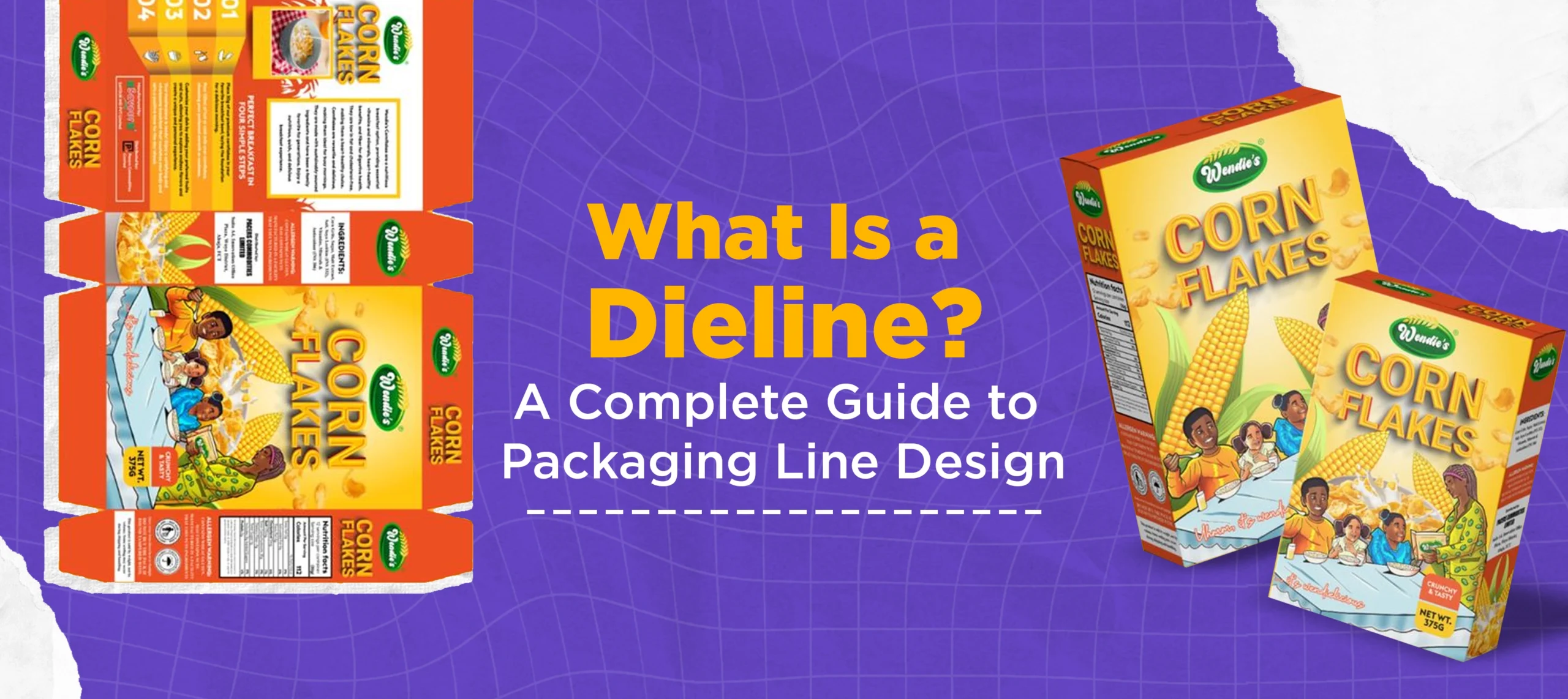
By Packaging is manufactured from flat materials that come in different types. These materials are then cut, folded, and glued together to create a perfectly shaped box. During this process, a digital design is used that guides the die-cutting machinery on where the box should be cut, creased, and where adhesive should be applied. This digital design is known as a dieline. In the printing and packaging industry, understanding this process is extremely essential for brands.
With my in-depth research and years of experience in the printing and packaging industry, I will inform you about what is a dieline, why it matters, how to read one, and how tools like Pacdora make the process far more accessible than it used to be. Whether you are a brand owner ordering custom packaging for the first time or a designer trying to nail your print file, this is the resource you need.
What Is a Dieline?
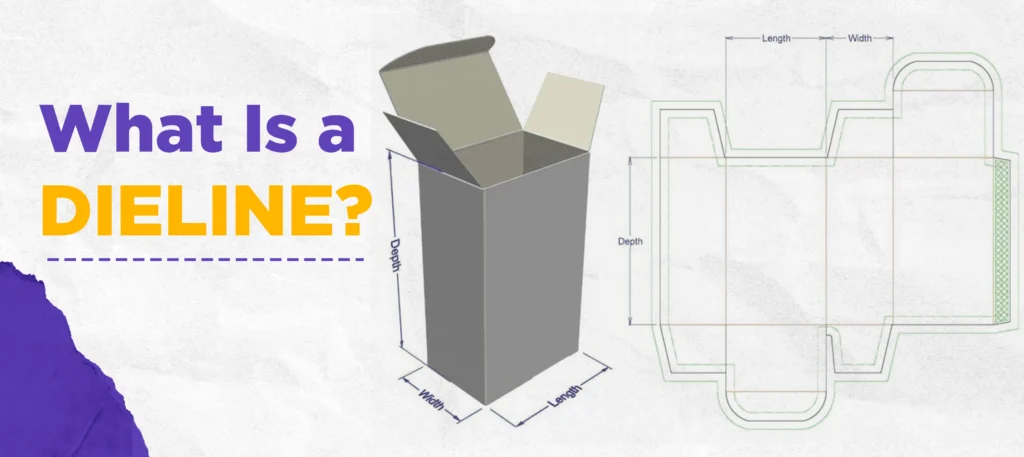
A dieline is a two-dimensional, flat template that maps out every cut, fold, perforation, and glue tab on a piece of packaging before it goes into production. Think of it as the architectural floor plan for your box. Just as a builder cannot construct a house without blueprints, a manufacturer cannot produce accurate custom packaging without a precise dieline.
In packaging line design, the dieline serves as the master reference document. The packaging is shown in its flattened, fully unfolded state. You can see all the panels of the box in one plane when you view a dieline. The material, once cut and folded along the dieline at the fold marks, is assembled into the box that you hold.
Both spellings are the same. In the print and packaging industry, you will encounter both variations regularly.
Dielines Examples
Here are some examples of dielines to help you clear the concept:
Why Dielines Matter in Packaging
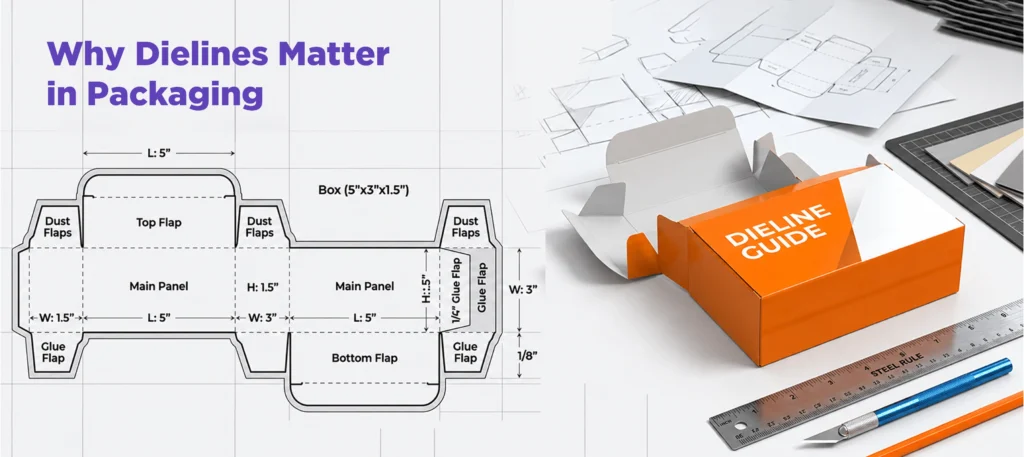
Dimensions and materials tell you how big a box is. A dieline tells you how that box actually comes to life. These are two very different things, and confusing them is one of the most common mistakes first-time packaging buyers make.
Here is why getting your box dieline right matters from the start:
Prevents Costly Errors
A mistake in the dieline say, a fold line placed 2mm off, does not just affect one box. It affects every single unit in the entire production run. Catching that error in the dieline stage costs nothing. It’s a whole other story if you catch it only after 10,000 units have been printed and cut.
Ensures That Your Artwork Is Placed Correctly
They tell your designer where to place each panel, the safety zones, as well as how much bleeding you should include. It is without a dieline that artwork can be placed incorrectly, and important elements such as logos or product name are trimmed.
Guides The Die-Cutting Machine
The physical cutting tool used in manufacturing the metal die plate is built directly from your dieline. The dieline will also be inaccurate if the plate is not. Every cut that this machine makes will show the error.
Transport Your Products Safely
Box dielines that are well designed ensure structural integrity. The dieline ensures that the box will fold correctly, shut securely and hold its shape even under stress and weight. Dielines are needed for custom food boxes to ensure that the contents remain fresh.
What Is a Dieline in Packaging: The Key Components
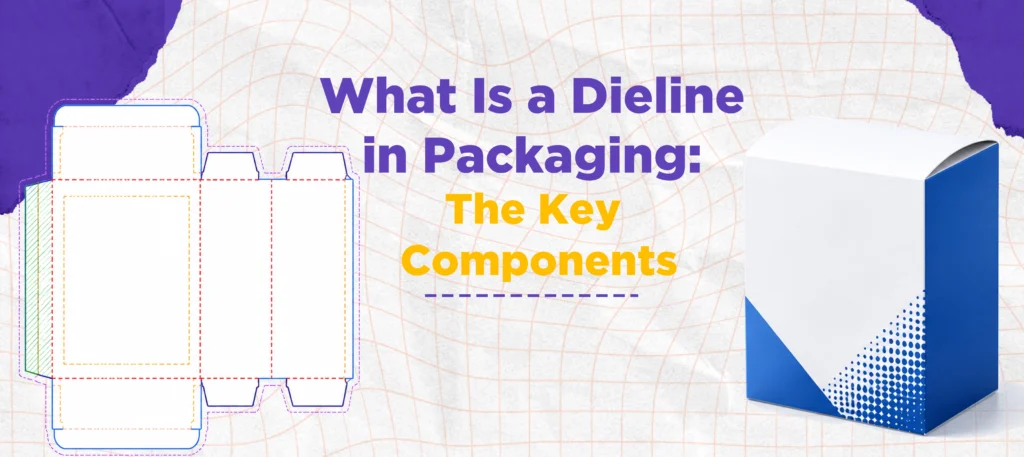
Reading a dieline is not complicated once you understand what each line type means. Here is a breakdown of the standard components you will encounter in any packaging line design file.
- Cut Lines: These are typically shown as solid lines and indicate exactly where the die-cutting machine will make its cuts. The cut line defines the outer boundary of the finished packaging after trimming.
- Fold Lines (Crease Lines): Usually shown as dashed or dotted lines, these mark every point where the packaging material will be scored and folded. Accurate fold lines are what allow a flat sheet to become a three-dimensional structure.
- Bleed Lines: Bleed refers to the extra printing area that extends just beyond the cut line, usually about 3mm or 0.125 inches. This buffer accounts for the slight movement of material during machine cutting. Without bleed, you risk getting a narrow white border around the edge of your finished packaging.
- Safety Lines (Safe Zone): These mark the inner boundary where all critical design elements, logos, text, barcodes must stay. Anything placed outside the safety line risks being cut off during production.
- Perforation Lines: These indicate where the material will be punched with a series of small holes to allow easy tearing or opening. Tear strips on cereal boxes and mailers are made possible by perforation lines.
- Seal/Glue Tabs: Mark the area where the adhesive will be used to keep the packaging together. These elements work together to produce a document that is precise and ready for production. The transition between flat sheet and finished box can be seamless when all the components have been marked correctly.
Die Line for Printing: What You Need to Know
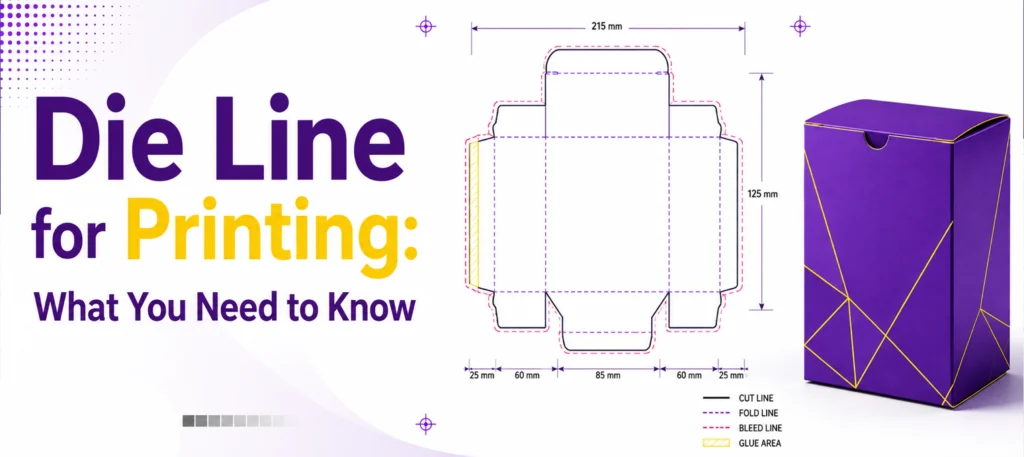
When it comes to die line for printing, file format and color settings matter just as much as the structural design itself.
The standard output format for a print-ready dieline is a PDF vector file, or an AI (Adobe Illustrator) file with CMYK color mode. Vector files are essential as they offer sharp precision at any size. Raster formats like JPG or PNG are not suitable for dielines due to the resolution loss that happens when these files are scaled. This can cause the mistakes during cutting.
Few critical guidelines to prepare a line of dies for printing:
- Keep the dieline structure separate from the artwork. Cutting and fold guide should belong on one sheet, your printed graphics on another. To avoid any confusion, the prepress team should read through the file to ensure that it is correct.
- This will ensure that fonts are converted into outline before submission. You can avoid typo substitutions that could shift the text and cause a design to look distorted.
- The color profile should be CMYK not RGB. RGB, or screen-based colors, is RGB. When colors are changed to CMYK, they can sometimes shift dramatically. Set your file in CMYK to get an accurate color preview.
- You should label Pantone colors, spot colours and other references in the design if applicable. This is crucial for branding colors that have to be exactly matched in multiple print runs.
How to Create a Dieline with Various Tools and Software
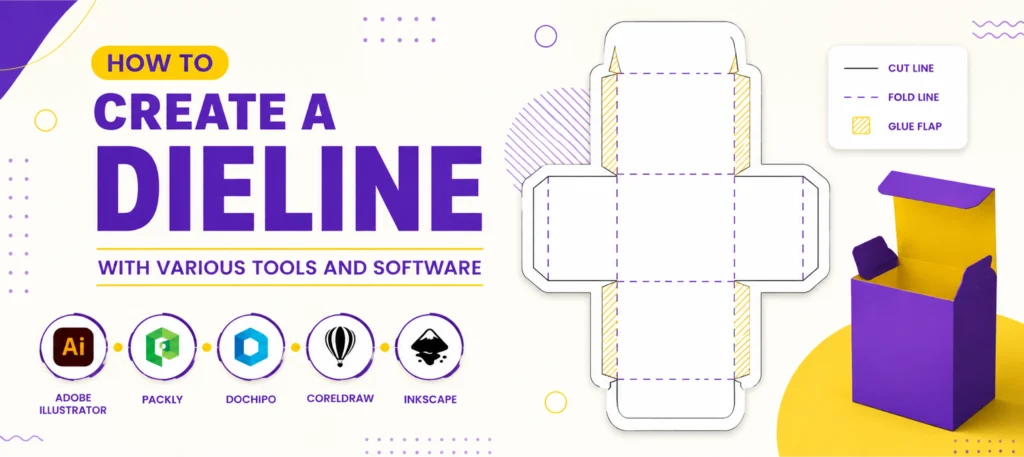
This software will help you create professional dielines. Here’s a list of popular software options based on experience.
ArtiosCAD
It provides structural engineering for the packaging industry. Built specifically for packaging it integrates directly with manufacturing, die-cutting, and design equipment. Designers can account for materials, board thickness, structural loads, etc. When working on high-volume, complex or technically challenging packaging, professionals will use this software.
Adobe Illustrator
Works well for adding artwork and graphics, but does not work for designing structural dielines. Manufacturers do not accept Illustrator raw files, without conversion. And the software does lack the structural engineering that is required by packaging line designs.
Pacdora
Has the perfect solution for those who require professional dieline designs but do not want the steep learning process of industrial software. Pacdora features a vast library of built-in templates, which includes dozens box styles, designs of mailers and packaging formats. It’s easy to use. You choose your box design, put in your dimensions and then you download the dieline. Finally, your artwork can be placed on it. Pacdora can simplify the packaging design process for those businesses without dedicated structural engineers.
Pacdora Templates are an ideal way to get started in the packaging industry for those who have never done it before. It is easier to design visually with professionally-constructed dielines
From Dieline to Die-Cutting – Complete Working Process
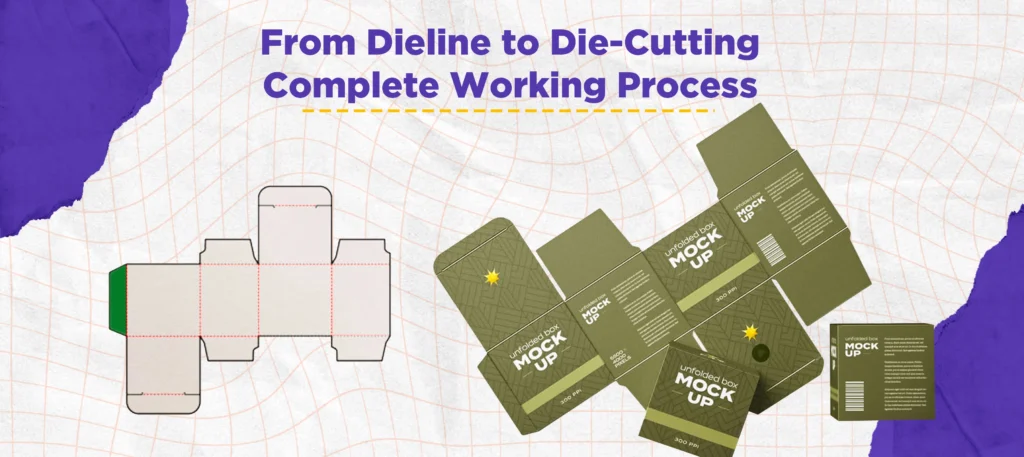
The file is sent to the printer once your artwork and dieline are finalized. The material is then die-cut after printing.
Die-cutting is similar to a large precision cookie cutter. A custom metal die plate is fabricated to match your dieline exactly. Die-cutting machines press the packaging material through with calculated force. This produces a precise, clean cut which follows the contours of your dieline. It is ready for folding and assembly.
It is for this reason that an accurate dieline file is essential. The die plate is built from your dieline file. The metal die will reflect any errors in your fold or cut lines. Every unit made from this die has the same error.
Always request a prototype before committing to full production. The prototype will be cut from the finalized dieline, and it gives you an actual three-dimensional view of your finished product. It is the last chance to check for structural problems, ensure that artwork appears correctly on every panel and that it functions properly.
Common Dieline Mistakes You Should Avoid
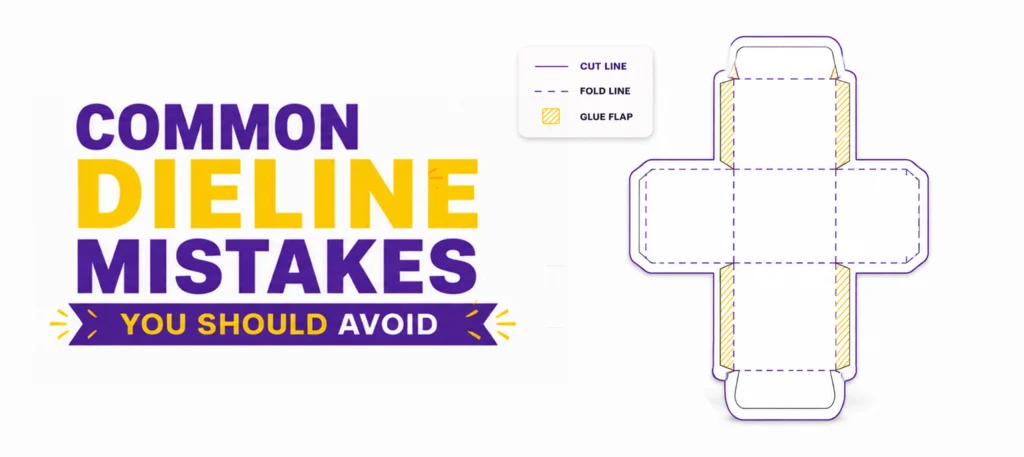
Even experienced designers occasionally submit dieline files with errors that delay production or increase cost. Here are the most common issues to watch for:
- Forgetting to include bleed. This is the single most frequent mistake. Always extend background artwork and non-critical design elements to the bleed line.
- Placing text or logos outside the safe zone. Even a small drift outside the safety margin can result in critical elements being cut off. Keep everything important well inside the boundary.
- Using the wrong file format. A JPEG or PNG dieline is not acceptable for production. Always submit vector files in PDF or AI format.
- Submitting a single-layer file. Mixing artwork and dieline structure on the same layer causes confusion during prepress and can result in the cutting lines being printed onto the packaging.
- Not accounting for material thickness. If you are using thick corrugated board, the internal dimensions of your finished box will be smaller than the flat dieline dimensions suggest. Always confirm with your manufacturer whether dieline dimensions refer to internal or external measurements.
Final Thoughts
Dielines are the basis of all custom packaging. If you get it right, the entire production flow will be smooth from digital files to final products. If you get it wrong, then your production process will be hampered by reprints and wasted material.
Knowing what dielines are, their components, the purpose of them, and the connection to die cutting will help you communicate with manufacturers and designers. Tools like Pacdora make professional packaging line design accessible to businesses of every size. And following the right output standards for your die line for printing ensures that what you see on screen is exactly what comes off the production line.
Custom Boxes Deals offers custom printed boxes and the best packaging solutions according to your precise specifications and your product requirements. If you are ready to start your custom packaging project the right way, contact us.

Anthony Kim
Hello, I'm Anthony Kim, a seasoned packaging consultant and designer. With a professional journey spanning over four years, I've evolved from a budding designer to a recognized expert in the field. Currently holding the position of Packaging Consultant, I've honed my skills in creating not just visually stunning packaging but also solutions that align with strategic business goals.
View all articles →