
Request Your Custom Quote
Tell us what you need. Our team normally replies within one business day.
CD Booklet Dimensions: Every Jewel Case Insert in mm, Inches and Pixels
 By
CD Booklet Dimensions: Every Jewel Case Insert in mm, Inches and Pixels
The standard CD booklet dimensions are 120 × 120 mm, or 4.724 × 4.724 inches, the same as the disc’s diameter. At 300 dpi that is 1417 × 1417 pixels, or 1488 × 1488 with a 3 mm bleed on every side. At least one print shop works to 4.75 inches instead, which is slightly larger, so the safest size is always the one on your printer’s own template.
CD Jewel Case Insert Sizes at a Glance
Wikipedia’s entry on optical disc packaging gives the jewel case and its printed parts. The inches and pixels below are worked out from those millimeters.
| Part | Finished size | Inches | Pixels at 300 dpi | With 3 mm bleed |
|---|---|---|---|---|
| Jewel case | 142 × 125 × 10 mm | 5.59 × 4.92 × 0.39 | n/a | n/a |
| Booklet page | 120 × 120 mm | 4.724 × 4.724 | 1417 × 1417 | 1488 × 1488 |
| Single folded leaf, flat | 242 × 120 mm | 9.528 × 4.724 | 2858 × 1417 | 2929 × 1488 |
| Back card, flat | 150 × 118 mm | 5.906 × 4.646 | 1772 × 1394 | 1843 × 1465 |
The booklet sits in the lid, held in place by two, four or six tabs, while the back card sits underneath the clear media tray.
120 mm or 4.75 Inches?
Both figures are described as the standard, but they are not the same size. 120 mm converts to 4.724 inches, while 4.75 inches converts to 120.65 mm, which makes it 0.65 mm larger in each direction.
One page benchmarked here, from Chilli Printing, sets the front insert at 4.75 by 4.75 inches. The others, and Wikipedia, give 120 mm. The difference is small, but it is real, so build your file to the template your printer sends, in its own units, rather than converting from a general figure.
The back card has the same issue. Two benchmarked pages give 5.906 by 4.625 inches, which works out to 150 by 117.5 mm. Wikipedia gives 150 by 118 mm, which is 4.646 inches tall.
Bleed and Pixels for a CD Booklet
Bleed is extra artwork that extends past the trim line, so that a slightly misaligned cut does not leave a thin white edge. RonyaSoft, a cover design software maker, uses 3 mm per side, which turns a 120 mm page into a 126 mm file. Chilli Printing asks for at least 0.125 inch, which turns a 4.75 inch page into a 5 inch file. Use the bleed your printer asks for.
At 72 dpi a 120 mm page is only 340 pixels across, which is fine for a preview on screen but far too small to print, so build print files at 300 dpi at their final size.
How Many Pages a CD Booklet Can Have

A saddle stitched booklet is made from sheets folded in half and stapled through the fold. Because one folded sheet makes four pages, the page count runs in fours: 4, 8, 12, 16 and so on.
That rules out a two page “booklet”, which the source page for this post lists. A front cover with a printed back is a single card rather than a booklet, so if that is all you need, order a single 120 mm card. The single folded leaf from the table, 242 × 120 mm flat, gives four pages without staples.
Wikipedia notes one limit on thick booklets. The tabs in the lid sometimes “grip the booklet too tightly, leading to tearing”, especially with larger booklets. If you are planning a long booklet, ask the printer how many pages their case and paper will take.
The Back Card and Its Spines
The back card is printed flat at 150 × 118 mm and then folded into a flattened U shape behind the tray. The two folded ends become the spines you read when the case stands on a shelf, and they usually carry the artist and title. Chilli Printing advises spine text of at least 6 points.
Slim Cases and DVD Cases Are Different
- Slim jewel case. Wikipedia gives most slim cases as 142 × 125 × 5 mm, roughly half the thickness, with two pieces instead of three and no place for a back card, and they generally hold a single printed slip rather than a full booklet.
- DVD case. A standard DVD case is 135 × 190 × 14 mm, with a 284 × 184 mm wrap label. The source page for this post presents the jewel case’s 142 × 125 × 10 mm as “DVD case dimensions”, but those are the measurements of a CD jewel case.
Paperboard Alternatives to a Jewel Case
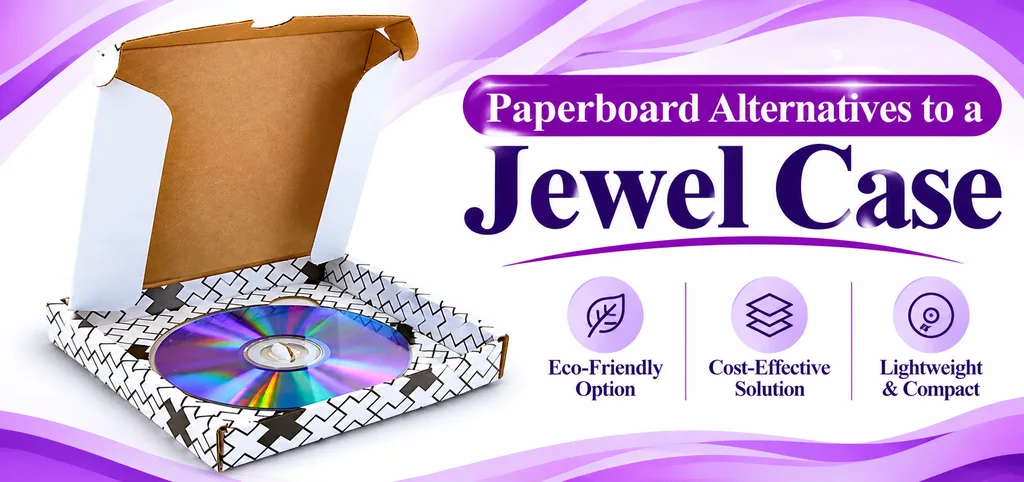
If you would rather skip the plastic case altogether, a paperboard pack can carry the artwork instead. Custom Boxes Deals makes custom CD sleeves and a bookend CD case that opens like a book. Printing is CMYK, Pantone or PMS, or unprinted. Send the disc count and what you want printed, and the size is set around it.
Frequently Asked Questions
What size is a CD booklet?
120 × 120 mm, or 4.724 inches square. At least one print shop uses 4.75 inches, which is 0.65 mm larger. Follow your printer’s template.
What size is a CD booklet in pixels?
At 300 dpi the finished page is 1417 × 1417 pixels, and the file becomes 1488 × 1488 pixels once a 3 mm bleed is added on each side.
How many pages can a CD booklet have?
Pages come in multiples of four, such as 4, 8 or 12, because each folded sheet makes four pages, so ask your printer how thick a booklet their case and paper will hold.
What size is the CD back insert?
150 × 118 mm flat, folded into a U so the two ends form the spines. An inch figure two benchmarked pages give, 5.906 by 4.625, is 150 by 117.5 mm.

Anthony Kim
Hello, I'm Anthony Kim, a seasoned packaging consultant and designer. With a professional journey spanning over four years, I've evolved from a budding designer to a recognized expert in the field. Currently holding the position of Packaging Consultant, I've honed my skills in creating not just visually stunning packaging but also solutions that align with strategic business goals.
View all articles →